Where the notebook lets you down
The paper khata is not wrong, it is just fragile. The problems are always the same few:
- There is no running total. To know what one customer owes, you add up their page again, and every re-add is a chance for a mistake.
- Part payments get lost. ₹500 paid against ₹1,200 is written somewhere, but not always next to the bill it was for.
- Nobody remembers how old a balance is. ₹2,000 owed for a week and ₹2,000 owed for three months are very different problems.
- Reminding is awkward. Asking a regular for money face to face, at the counter, in front of other customers, is something most owners put off.
- One lost or wet notebook can wipe out months of money owed to you.
What a digital khata has to do
Any app you use for udhaar should do at least these five things. If it does not, it is just a notebook on a screen.
- Keep a running balance for every customer, updated the moment a bill goes on credit or a payment comes in.
- Link every entry to the bill it came from, so a dispute is settled by opening the bill, not by memory.
- Accept part payments: some now, the rest on khata, on the same bill.
- Show how old each balance is, so the oldest money gets chased first.
- Send a polite reminder for you, with the exact amount, so you do not have to ask in person.
Doing it in DukanUp, step by step
Khata is part of the bill in DukanUp, not a separate book, so nothing has to be written twice.
- Bill the customer as usual. At payment, choose Credit and pick the customer. If they pay part now, enter what they paid and the rest goes on their khata automatically.
- To see who owes you, open Sales, then the Khata tab. Every customer is listed with what they owe and for how many days. Sort by most owed or by oldest.
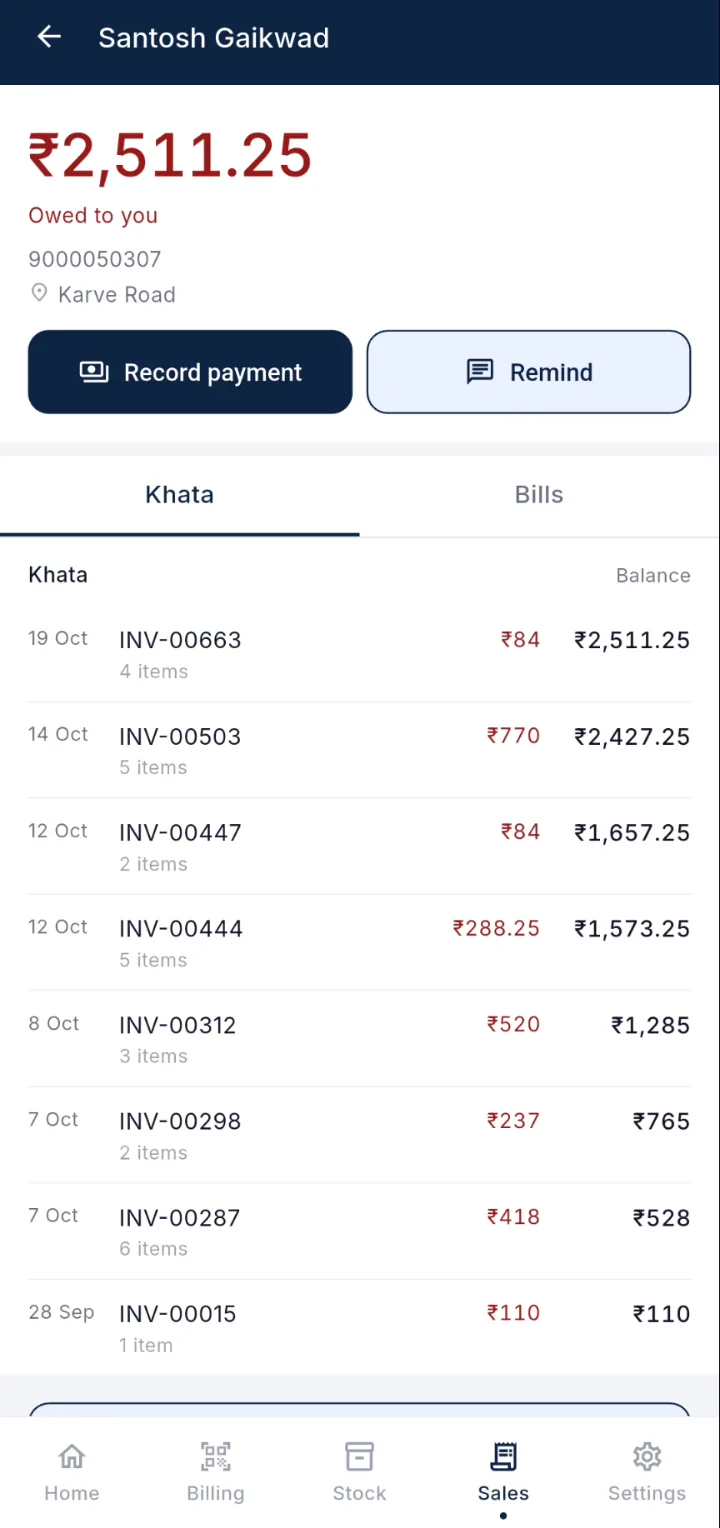
- When a customer pays, open their page and tap Record payment. Enter the amount and whether it came as cash or UPI, and the balance updates at once.
- To remind someone, tap Remind on their page. A WhatsApp message with their balance is ready to send.
Moving your old notebook across
You do not need to copy months of history into the app. Do this instead:
- Start with today. Every new credit sale goes into the app from now on.
- For older balances, enter each customer’s total as an opening balance, the day they next come in or pay. That way the number is confirmed with them, face to face.
- Keep the old notebook until the last old balance is cleared, then put it away.
On DukanUp’s Free plan, khata covers up to 25 customers. Plus removes the limit. Billing itself is never limited on any plan.
Three habits that bring the money in
- Look at the khata sorted by oldest once a week. Old balances are the ones that quietly turn into losses.
- Remind on the same day every week or month, so customers expect it and it never feels personal.
- Record a payment the moment it arrives, before the next customer. A payment noted later is a payment that gets forgotten.
Questions
Is a khata on the phone safe if I lose the phone?
In DukanUp your khata is stored on our servers as well as on the phone, so signing in on a new phone brings it back. A paper notebook that is lost is gone.
Can my customer see what they owe?
When you send a reminder, the WhatsApp message carries their balance. They do not need the app.
Do I have to enter old entries one by one?
No. Enter each customer’s current total as an opening balance and carry on from there. Nothing needs to be back-dated.
